
Site Provisioner for SharePoint
AUTOMATE THE CREATION OF STRUCTURED SHAREPOINT ENVIRONMENTS
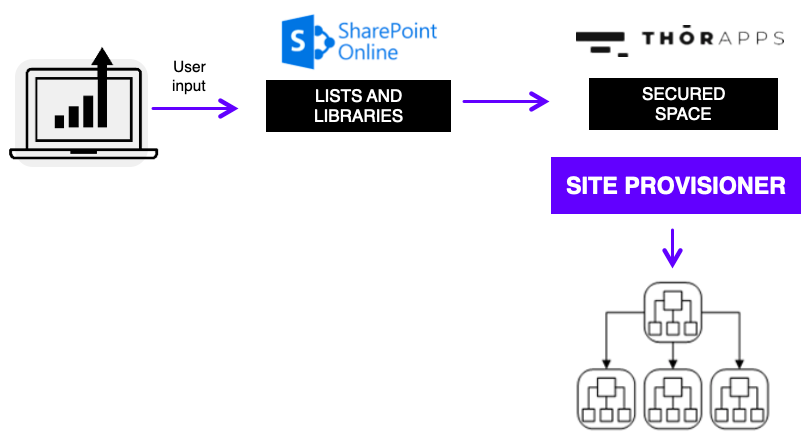
ThorApps Site Provisioner automates the creation of SharePoint sites using a controlled provisioning process driven from a central SharePoint navigator list. Using the SharePoint PnP Provisioning Engine, it applies predefined templates to create consistent SharePoint environments with the required structure, libraries, lists, metadata, permissions and navigation.
NO CREDIT CARD REQUIRED

Creates new SharePoint sites through a trigger URL linked to a central navigator list, providing a governed way to provision new environments.
Apply standard configuration including document libraries, lists, custom metadata, content types, navigation, permissions and pages.
Uses the Microsoft PnP Provisioning Engine to apply SharePoint templates in a structured and repeatable way without manual rebuilding.
Structured SharePoint Topology
Build structured environments based on organisational requirements, forming the foundation for broader SharePoint-based business solutions.
CASE STUDIES
UTILITIES
Automate SharePoint site creation with templates — consistent structure, every time.

WHY SITE PROVISIONER?
Eliminate manual SharePoint site creation.
We have 4 compelling reasons why you should rely on Site Provisioner.
1.
Controlled Site Creation
Site Provisioner creates new SharePoint sites through a trigger URL linked to a central navigator list. This provides a governed way to provision new environments while maintaining control over what is created and how it is structured.
2.
Consistent SharePoint Templates
Provisioning templates can apply standard configuration including document libraries, lists, custom metadata, content types, navigation, permissions, pages and branding elements.
3.
Built on PnP Provisioning Engine
Site Provisioner uses the Microsoft PnP Provisioning Engine to apply SharePoint templates in a structured and repeatable way. This allows template-based deployment without manually rebuilding the same configuration each time.
4.
Supports Structured Topology
Site Provisioner helps build structured SharePoint environments based on organisational requirements and can form the foundation for broader SharePoint-based business solutions.
HOW DOES IT WORK?
Site Provisioner follows a simple 5-step process to create fully configured SharePoint environments from a central navigator list.
Create Navigator Entry
An entry is created in a central SharePoint navigator list — either by a user or an automated process.
Click "Create" or "Open"
A user clicks "Create" on the item (if no site exists) or "Open" (if a site already exists). The item data starts the provisioning process.
Background Site Creation
Site Provisioner creates the SharePoint site (and/or site collection) in a background job.
Apply PnP Template
Site Provisioner applies a customised PnP template to configure the site with the required structure.
Navigate to New Site
The user is automatically navigated to the new, fully configured site — ready to use.
KEY BENEFITS
Everything you need for reliable, repeatable SharePoint site provisioning.
ThorApps offers its own SSRS farms, which is a secured space to store your data.
Get started today! No credit card required.
Request your
30-day trial and get
$50 credit to test Site Provisioner in your own SharePoint environment
>
Upon submitting this form, you will be provided with the installation instructions for our Site Provisioner App. These instructions will lead you through adding the app to your SharePoint site and provide further links to installation documentation.
